That was my opinion when I updated my portfolio that night. The next morning, after a 45 minute run and a freshly brewed coffee in hand I opened it again. Like every other designer, I wasn’t feeling that confident about it, just had the sense that something was off. But, before jumping into working on it again I wanted a critique who will be direct with their feedback without the sugarcoating.
I have been using agentic browsing since its inception, Claude launched their browser extension & Comet (Perplexity), Dia (Browser Company). I decided to ask these AI agents to review my portfolio and critique it brutally.
So I asked:
“Review my portfolio with brutal honesty and provide actionable improvements. Evaluate the following:
Please be brutally honest and don’t sugarcoat it. I need specific, actionable feedbacks to improve my portfolio”
- What’s your immediate reaction within the first 5 seconds.
- Did you find any readability, typography, and visual hierarchy.
- Are metrics and results in each case study clearly highlighted?
- Do you think it fits for the [role] I am applying for?
- What stuck with you after going through my portfolio.
The response shook me. It was brutally honest and harsh. I felt the urge to explain to the agent some of my decisions I took to make it like that. But the AI was right, because 60% of the suggestions were things that were obvious. It told me my portfolio doesn’t communicate what I do, what I bring and where I am. It also gave me a list of quick fixes that could be done in 5–10 minutes which will highlight it more but also a list of fixes that could be done later and will require more effort.
The answer is not that simple, but we have been preparing for this without even realizing it. Let’s time-travel, in the late 70s and early 80s when GUIs hit the market with Xerox Star they changed the definition of ‘user’ from being “Operator-driven” to “Consumer facing”. The design had to adapt to this. PCs in the 80s opened new challenges for designers, there was now an increasing need for Usability and accessibility and this led to rise of UX design. Design followed.
It was 2007 when this line by Steve Jobs, “An iPod, a Phone, and an Internet communicator” changed the world and shifted mobile phone design from “keyboard-centric” to a “screen-centric”. The design adapted for swipe, pinch, press, tap, flat icons, etc.
In 2010, Voice user interfaces (VUIs) with smart speakers and AI voice assistants removed the visual interface completely. Design expanded beyond screens into conversational flows and auditory cues.
But in parallel, another paradigm shift was happening that we don’t fully take into consideration when designing, i.e. Screen Readers. They were navigating interfaces not with pixels and visual layouts but through semantic structure. They parse the DOM, interpret ARIA labels and rely on proper heading hierarchy, alt text, and logical structure to make sense of what’s on screen.
Accessibility was built by humans, for humans. But the structured meaning it established now makes interfaces readable and legible to AI as well.
Agentic browsers like Dia, Perplexity Comet, OpenAIs Atlas or in future your own personal browser which you can now quickly create, will work the same way. While modern AI can interpret visuals, automated agents rely primarily on the DOM- the underlying HTML structure of the page. They will look for semantic structures, headings, alt text and not visual designs. So what is it that the agent will see:
The agent sees:
- The HTML tree (elements, attributes, hierarchy)
- ARIA labels and roles
- Text content and link destinations
- Form field labels and types
- Semantic tags like <nav>, <main>, <article>, <aside>
and
The agent does not see:
- Color alone to communicate meaning
- Icons without text labels
- Visual layout without semantic structure
- Context from images without alt text
Let’s see an example:
<div class="btn-red" onclick="doThing()"> <span>Go</span> </div>
What the agent sees: A div with a vague class name, containing the word “Go.” Go where? Do what? It has to guess.
now, if we do this:
<button aria-label="Add to cart - Nike Air Max 90" role="button" type="submit"> Add to Cart </button>
Now the agent knows exactly what this does, what product it relates to, and that it’s an actionable element.
Lets take another example of a simple instruction you gave to any AI. “Find me a 2BHK apartment under 80K AED in Dubai Marina on Bayut.”
Here’s roughly what the browser agent does:
- Navigate- Loads bayut.com, identifies the <nav> and search elements
- Interact- Finds the search form, identifies filters by their labels (aria-label, <label> tags, placeholder text)
- Input- Fills in location, room count, price range based on semantic cues
- Parse results- Reads the listing cards, extracting structured info (price, location, size) from semantic HTML or schema markup
- Decide- Compares listings against the user’s criteria
- Act- Either presents results or clicks into a listing for more details
At every step, the agent is relying on clear labels, logical hierarchy, and structured data.
Why this matters beyond theory.
Lets look at emerging markets where people still struggle to load a webpage. In India, where approximately 250 million to 300 million people still use 2G networks. A user on 2G networks asks AI agent “Find a blue kurta for me under ₹500 on Myntra”. With such low network, the agent will navigate to the kurta listing page. Images don’t load. Now what?
If the Kurta card is just a container with an image, price and title “Kurta-Navy”, the agent has not too much to work with. It can’t see the image, its a vague title and there’s no proper structure. But, if the Kurta card has proper semantic structure underneath: product.color: navy-blue, product.category: kurta, product.fabric: cotton, product.price: 499, product.image.alt: “Navy blue cotton kurta with front view” (simplified for clarity). The agent can now answer the user even if the images don’t load up because of low network.
Let’s take another example: In Bengaluru, with fast 5G network, a user with diabetes asks an AI agent to “Order me a low-sugar lunch from Zomato”. The agent will open the app and if the item names are just names & photos “Special Punjabi Thali”, the agent has no idea what is in it. But if the restaurant has structured nutrition data: nutrients, calories, sugar content, allergens, etc. Then the AI agent will make an informed choice and will order a fitting lunch.
Choosing to include the structure attributes in the item template is a product design choice which impacts discoverability, automation, accessibility, performance.
So what does this mean for designers?
This extends beyond those examples and the implication is clear, we have to consciously be aware and design with semantic structure for AI interpretation. As a designer, here’s what we need to understand now:
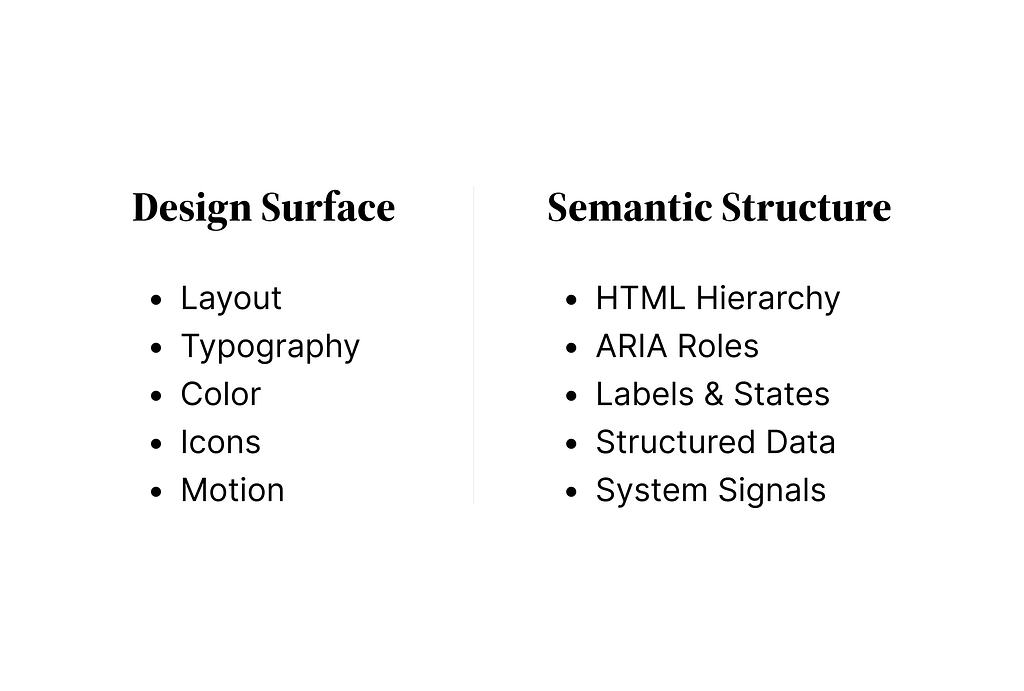
Here’s what we need to do differently:
- Information architecture becomes dual-purpose- We now have to think for organizing content for machines parsing too, rather than designing for visual heirarchy and F-patterns.
- Labels are a design deliverable- The text on button, forms fields, sections is now primary interface for AI.
- States need to be explicit- An agent can’t tell something is “loading” or “selected” from a color change. States need to be declared in the markup, aria-busy, aria-selected, disabled attributes.
- Design specs should include semantic annotations- During handoffs we could annotate what ARIA roles, labels, and structured data each component needs.
There is more that we need to do differently but we start at these and what we treated as a checkbox exercise is now becoming a strategic requirement.
and we need to understand that:
Visuals are seen by humans. They are parsed by systems. Maybe, the future belongs to those who design for both.